Margaret Powell House - connecting to projector
It is quick and easy to connect to the wifi and to the large display screen in the main room. There is an app that can be installed, however this requires assistance from IT due to security. However this is not required and does not provide any additional benefits.
1
Connect to WiFi
in the room
a. The password will be provided or displayed in the room
2
Download the
Airtame guest app
a. Go to https://airtame.com/download/
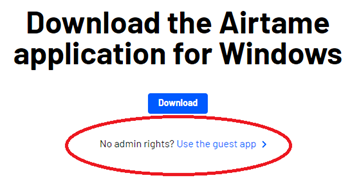
b. Click on the link ‘Use
the guest app’ as shown below. Do NOT click on the download button as this
will require IT to enter a password
3
Launch the guest
app.
a. It will be called something like Airtame-4.4.0-portable.exe
4 Enter the name or
address of the display.
a. This will be displayed on or around the large display screen.
You are now connected to the large display.